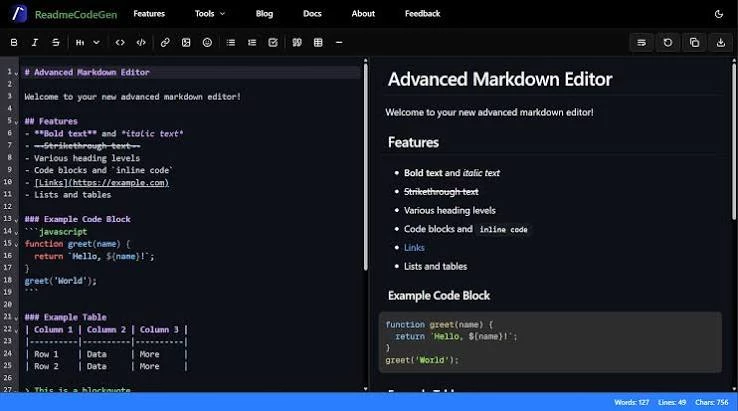
1. Use a Markdown editor #### are heading tags in…

3 reactions
1. Use a Markdown editor
#### are heading tags in Markdown. If you paste your text into an editor that understands this language (such as Typora, Obsidian, or Visual Studio Code with a Markdown extension), these symbols will automatically be transformed into well-formatted subheadings. You can then export your document to Word or PDF with clean formatting, without needing to manually remove the tags.
2. Quick conversion in Word or Google Docs
If you prefer to work directly in Word or Google Docs, you can use the Find/Replace function. For example, search for #### (with a space) and replace it with nothing. Then, apply a heading style (Heading 2 or Heading 3) to the relevant lines. This allows you to transform the sections into clear and professional subheadings, without leaving any trace of the Markdown.
3. Paste without formatting
Some browsers and software offer a shortcut to paste plain text, without preserving the formatting. On Windows, it's often Ctrl+Shift+V, and on Mac, Cmd+Shift+V. In Word or Google Docs, you can also use the "Paste without formatting" option. This automatically removes the #### and leaves you with plain text that you can format as you wish.
4. Automate with a script
For those who like to automate, a small script (for example, in Python) can clean up the text by removing Markdown tags and converting headings to uppercase or bold. This saves time if you regularly copy text from Copilot. You paste your raw text into the script, and it returns a ready-to-use version, without ####.
#### are heading tags in Markdown. If you paste your text into an editor that understands this language (such as Typora, Obsidian, or Visual Studio Code with a Markdown extension), these symbols will automatically be transformed into well-formatted subheadings. You can then export your document to Word or PDF with clean formatting, without needing to manually remove the tags.
2. Quick conversion in Word or Google Docs
If you prefer to work directly in Word or Google Docs, you can use the Find/Replace function. For example, search for #### (with a space) and replace it with nothing. Then, apply a heading style (Heading 2 or Heading 3) to the relevant lines. This allows you to transform the sections into clear and professional subheadings, without leaving any trace of the Markdown.
3. Paste without formatting
Some browsers and software offer a shortcut to paste plain text, without preserving the formatting. On Windows, it's often Ctrl+Shift+V, and on Mac, Cmd+Shift+V. In Word or Google Docs, you can also use the "Paste without formatting" option. This automatically removes the #### and leaves you with plain text that you can format as you wish.
4. Automate with a script
For those who like to automate, a small script (for example, in Python) can clean up the text by removing Markdown tags and converting headings to uppercase or bold. This saves time if you regularly copy text from Copilot. You paste your raw text into the script, and it returns a ready-to-use version, without ####.


2
| 96,000 mlx | |
| 78 | |
| 3 |