I built a free browser tool that turns single-page PDFs…
0 reactions
I built a free browser tool that turns single-page PDFs into realistic book spreads — no install, no sign-up
After one too many "wouldn't it be nice if there was a tool that just did this" moments while staring at single-page PDFs that needed to look like an actual open book — I built one.
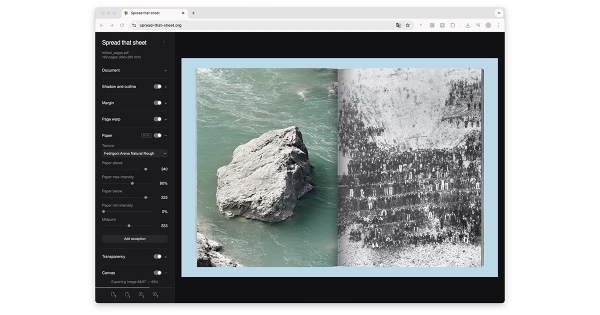
**Spread that sheet** https://spread-that-sheet.org takes a PDF where each page is a single leaf and pairs them into double-page spreads — simulating how they'd look in a physical open book.
You can fine-tune:
* **Gutter shadow** — adjustable intensity and width
* **Page curvature** — pages compress near the spine like a real binding
* **Page margins** — visible page edges that darken gradually
* **Paper texture** — built-in textures or upload your own
* **Transparency** — reverse-side bleed-through for thin paper simulation
* **Cover board** — hardcover expansion with adjustable darkness
* **Canvas wrapper** — custom background for presentation-ready output
* **Multiple PDFs** — combine cover + interior files with auto page mapping
The result looks very close to what you'd get scanning an open book on a flatbed scanner.
There are probably too many options — I'll admit I got a bit carried away — but if you ever get lost, just hit the **?** button to bring up the interactive guide at any time.
Export as PDF, PNG, or JPG at full 300 DPI. Everything runs locally in your browser — nothing gets uploaded anywhere.
Would love to hear your feedback: spread-that-sheet.org https://spread-that-sheet.org
#entertainment
After one too many "wouldn't it be nice if there was a tool that just did this" moments while staring at single-page PDFs that needed to look like an actual open book — I built one.
**Spread that sheet** https://spread-that-sheet.org takes a PDF where each page is a single leaf and pairs them into double-page spreads — simulating how they'd look in a physical open book.
You can fine-tune:
* **Gutter shadow** — adjustable intensity and width
* **Page curvature** — pages compress near the spine like a real binding
* **Page margins** — visible page edges that darken gradually
* **Paper texture** — built-in textures or upload your own
* **Transparency** — reverse-side bleed-through for thin paper simulation
* **Cover board** — hardcover expansion with adjustable darkness
* **Canvas wrapper** — custom background for presentation-ready output
* **Multiple PDFs** — combine cover + interior files with auto page mapping
The result looks very close to what you'd get scanning an open book on a flatbed scanner.
There are probably too many options — I'll admit I got a bit carried away — but if you ever get lost, just hit the **?** button to bring up the interactive guide at any time.
Export as PDF, PNG, or JPG at full 300 DPI. Everything runs locally in your browser — nothing gets uploaded anywhere.
Would love to hear your feedback: spread-that-sheet.org https://spread-that-sheet.org
#entertainment


| 2,000 mlx | |
| 3 | |
| 0 |