10 reactions
For tangled #browser and #node issues on windows
For some reasons, windows can block tangled and /or the node from running correctly (happened to me).
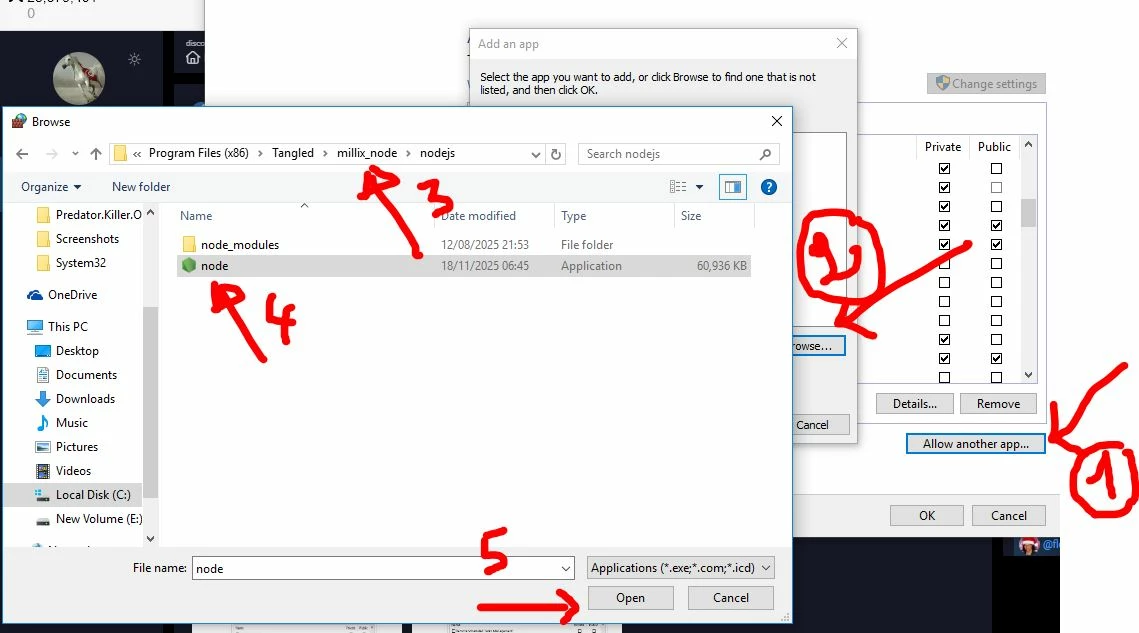
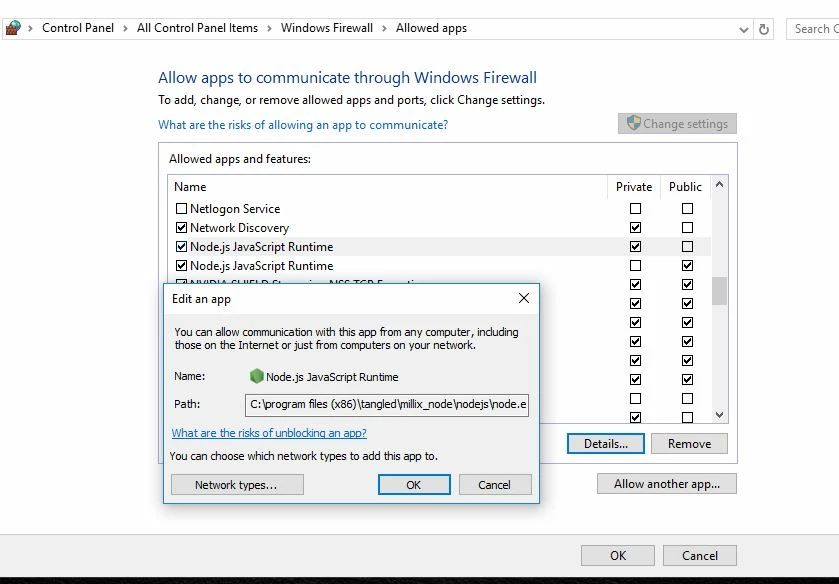
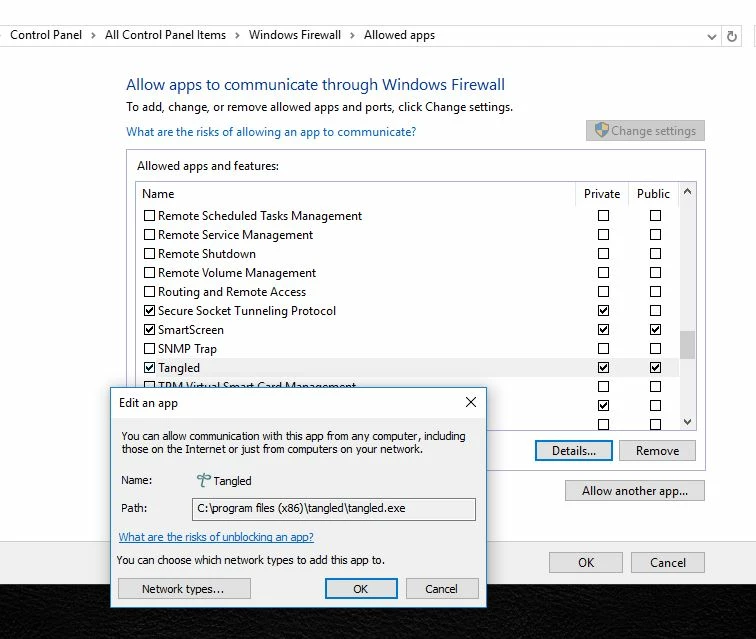
Check if tangled . exe and node .exe are not blocked by the firewall .
to do so , go to :
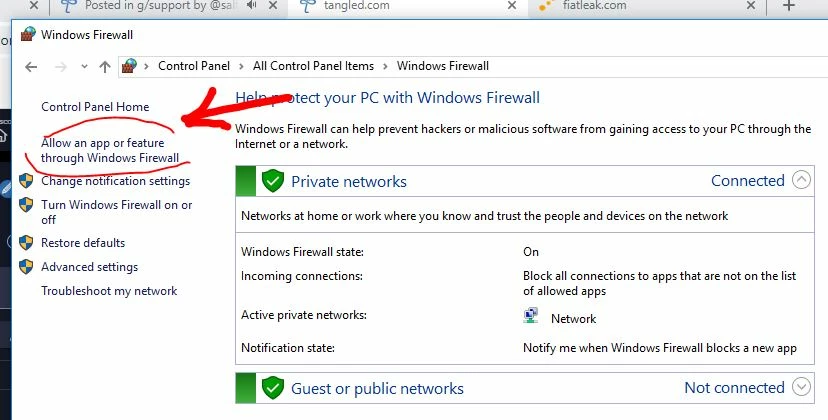
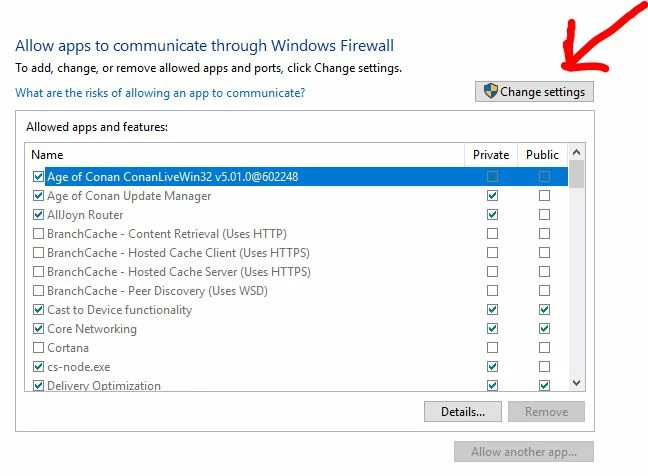
control panel ... windows firewall ... allow app or feature through windows firewall ... change settings ... then follow the screenshots
then restart your PC
i hope it will help to solve it as it already worked for me. GL 👌
#troubleshooting
1/5


3

2

1


0 reactions
One thing about Crypto wallets no one seems to discuss is what happens when you move to a new computer from an older one.
A couple of years back I had to move to a new comp as the one I'd had since 2007 finally collapsed.
I did manage to have the old HDD put through a successful data recovery and al was intact.
However...I am still trying to find all my keys and such for my Crypto accounts.
NO, there's not much in them, but I would like to find the log-in info again just because it's a mental 'itch', something I feel I must do rather than abandon them.
The other issue is that the log-in info I do have and have tried to use to log in to some of my accounts/wallets doesn't work.
'Why' is a mystery. I am using the correct info and such, and errors on that side of things have been entirely ruled out.
So, if you are about to move from an older comp to a new one, I strongly suggest copying everything to a USB drive (and make sure you don't lose it) or to printed-off hardcopies--maybe both to be safe.
I don't know if my experience is unique or uncommon or anything about how many others have experienced the same but I thought it might help someone sometime if I mentioned this so they can avoid this head-scratcher of a puzzle.
For now, I'll just open new Wallets, proceed from there while pursuing solutions to the puzzle as that's all I can really do right now.

Enclosed pic nicely sums up how we all feel regarding tech at one time or another. lol
Thank-you for reading.
~RL Blackburne
#crypto #wallet #keys #computer #troubleshooting
A couple of years back I had to move to a new comp as the one I'd had since 2007 finally collapsed.
I did manage to have the old HDD put through a successful data recovery and al was intact.
However...I am still trying to find all my keys and such for my Crypto accounts.
NO, there's not much in them, but I would like to find the log-in info again just because it's a mental 'itch', something I feel I must do rather than abandon them.
The other issue is that the log-in info I do have and have tried to use to log in to some of my accounts/wallets doesn't work.
'Why' is a mystery. I am using the correct info and such, and errors on that side of things have been entirely ruled out.
So, if you are about to move from an older comp to a new one, I strongly suggest copying everything to a USB drive (and make sure you don't lose it) or to printed-off hardcopies--maybe both to be safe.
I don't know if my experience is unique or uncommon or anything about how many others have experienced the same but I thought it might help someone sometime if I mentioned this so they can avoid this head-scratcher of a puzzle.
For now, I'll just open new Wallets, proceed from there while pursuing solutions to the puzzle as that's all I can really do right now.
Enclosed pic nicely sums up how we all feel regarding tech at one time or another. lol
Thank-you for reading.
~RL Blackburne
#crypto #wallet #keys #computer #troubleshooting