2
0
5
11
0
73



0 reactions
Private Peer-to-Peer Tools for Modern Communication
In a world where almost every message, file, and piece of text you share passes through someone else’s servers, privacy has become a luxury rather than a default. Most popular apps and services store your data — sometimes temporarily, sometimes indefinitely — and many of them scan, log, or analyze what you send. Even services that claim end-to-end encryption often still rely on central servers that can see who is talking to whom, when, and how often.
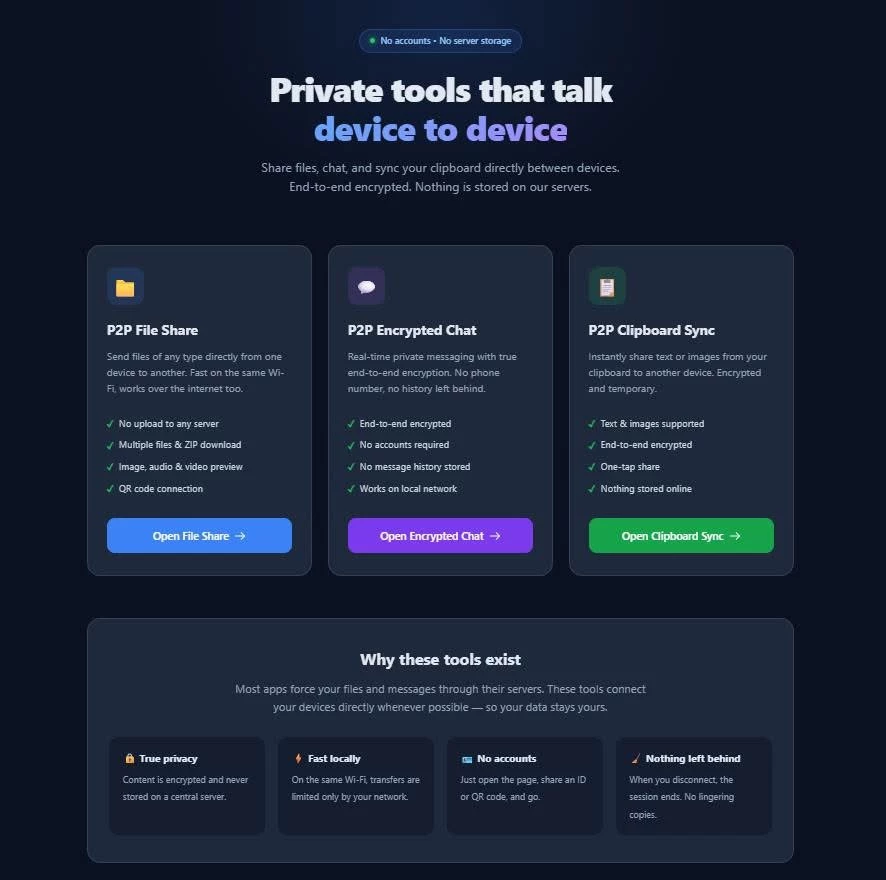
The three tools described here take a fundamentally different approach. They are built on pure peer-to-peer technology using WebRTC. This means the data travels directly from one device to another whenever possible. No permanent storage of your content sits on a central server. There is no account system, no cloud upload step for the actual payload, and no third-party intermediary holding onto your files or messages after the transfer is complete.
These tools are designed for people who value simplicity, speed on local networks, and genuine privacy without the complexity of traditional secure software.
1. P2P File Share
P2P File Share lets you send files of almost any type directly from one device to another. You open the page on both devices, share a short Peer ID (or scan a QR code), and transfer begins. Files move in chunks over an encrypted WebRTC connection. Multiple files can be queued and sent in sequence. On the receiving side you can preview images, play audio or video, and download everything individually or as a single ZIP archive.
There is also a local-only variant that works especially well when both devices are on the same Wi-Fi network. In that mode the transfer is extremely fast and does not consume any external bandwidth quota. When devices are on different networks, a small amount of relay traffic may be used, but the actual file content still travels peer-to-peer whenever the connection allows it.
Why choose this over conventional file-sharing services?
Most people currently use cloud upload services, messaging apps with file limits, or email attachments. Those options force you to upload the entire file to a remote server first. That creates several problems: the upload can be slow on poor connections, the service may impose size limits, the file sits on someone else’s infrastructure (sometimes for days or weeks), and you have no real guarantee that it will be deleted after the recipient downloads it. Many services also scan files for “safety” or advertising purposes.
With P2P File Share the file never has to live on a third-party server. The moment the transfer finishes, the only copies that exist are the ones you and the recipient choose to keep. There is no waiting for an upload to complete before the other person can start downloading. On a local network the speed is often limited only by your Wi-Fi or Ethernet connection, which is usually far faster than uploading to the internet and downloading again. You also avoid creating accounts, verifying email addresses, or dealing with expiring download links.
This makes the tool ideal for quickly moving photos, documents, archives, or media between a phone and a computer, between two laptops, or between colleagues in the same office — without leaving a trail on a corporate or commercial server.
2. P2P Encrypted Chat
P2P Encrypted Chat provides a simple, real-time messaging interface that is end-to-end encrypted from the first message. After connecting via Peer ID or QR code, the two devices perform a key exchange using proven cryptographic libraries. From that point every message is encrypted before it leaves the sender’s device and can only be decrypted by the recipient.
There are no chat histories stored on a server, no message backups in the cloud, and no metadata profiles built about your conversations. When you disconnect, the session ends. The interface is intentionally minimal: a clean message list, a text input, and a disconnect button.
Why choose this instead of mainstream messaging apps?
Popular messaging platforms almost always require a phone number or email address. They keep extensive metadata — who you talk to, how often, at what times, and from which devices. Even when the content is encrypted, the service still knows a great deal about your social graph. Many of these apps also encourage cloud backups that re-introduce the very data you thought was private. Group chats, stickers, and feature bloat further expand the attack surface and the amount of information collected.
P2P Encrypted Chat removes nearly all of that. There is no identity system beyond the temporary Peer ID generated for the session. No phone number is required. No long-term conversation history is retained by any third party. The encryption is handled client-side with well-known, audited libraries rather than a proprietary black box. Because the connection is direct whenever possible, latency is often lower than going through distant data centers, especially when both people are on the same local network.
It is particularly useful for sensitive one-on-one conversations, quick coordination during travel, or situations where you simply do not want a permanent record of the exchange living on someone else’s servers.
3. P2P Clipboard Sync
P2P Clipboard Sync solves a small but frequent frustration: moving text or images between devices without uploading them somewhere. You connect two devices the same way as the other tools, then either press a button to share whatever is currently on your clipboard or paste directly into a designated zone. The content — whether plain text or an image — is encrypted and sent instantly to the other device. From there you can copy it to the local clipboard or save an image.
The tool respects size limits for practicality (images are capped to keep transfers fast) and includes helpful mobile-specific instructions, especially for iOS where clipboard access is more restricted.
Why is this better than the usual workarounds?
People normally solve the “I need this text or screenshot on my other device” problem by emailing themselves, pasting into a messaging app, uploading to a notes service, or using a cloud clipboard that stores everything in the clear (or under a weak password). Each of those methods creates an unnecessary copy of the data on a remote server. Screenshots of private information, temporary passwords, addresses, or draft text end up sitting in inboxes or cloud notes long after they are needed.
Clipboard Sync never stores the content anywhere except on the two devices involved in the session. The transfer is encrypted, temporary, and disappears when you disconnect. It is faster than composing an email or opening another app, and it avoids the privacy cost of those alternatives. For anyone who regularly switches between phone and computer, or between multiple computers, it removes a daily friction point while keeping the data private.
Shared Advantages Across All Three Tools
Several strengths apply to the entire suite:
True peer-to-peer architecture** — Content travels directly between devices whenever the network allows it. Relay servers, when used at all, only help with connection setup or brief fallback; they do not retain your files or messages.
No accounts required** — You do not create a username, link a phone number, or hand over an email address. A temporary Peer ID is enough.
End-to-end encryption where it matters** — File transfers, chat messages, and clipboard content are protected so that only the intended recipient can read them.
Works offline on local networks** — When both devices are on the same Wi-Fi, transfers can be extremely fast and completely independent of the public internet.
Minimal attack surface** — There is no large server-side database of user content to breach, no long-lived accounts to hijack, and no advertising or analytics trackers baked into the experience.
Simple, focused interfaces** — Each tool does one job well instead of trying to become an all-in-one platform loaded with features you did not ask for.
Who These Tools Are For
These tools are especially valuable for:
People who regularly move files or text between their own devices and prefer not to use cloud services for that purpose.
Journalists, researchers, activists, or professionals who handle sensitive material and want to minimize the number of servers that ever see the data.
Anyone working in environments with restricted or monitored internet access who can still communicate over a local network.
Users who simply dislike creating yet another account or leaving digital footprints on commercial platforms.
Teams that need occasional secure, temporary channels without setting up complex self-hosted infrastructure.
They are not intended to replace full-featured collaboration suites or large-scale team messaging platforms. They shine in focused, private, device-to-device scenarios where speed, simplicity, and the absence of permanent third-party storage matter most.
A Different Philosophy
Most communication tools today are built around the idea that your data should live in the cloud so it can be accessed from anywhere, synced automatically, and monetized through features or advertising. The three tools described here start from the opposite premise: the best place for your private data is on the devices that actually need it, for only as long as they need it.
By removing the permanent middleman, they reduce both privacy risk and unnecessary complexity. You connect, transfer what you need, and disconnect. Nothing is left behind on a server you do not control.
If you have ever felt uneasy about uploading a private document to a file-sharing site, pasting a sensitive message into a mainstream chat app, or emailing yourself a screenshot just to move it between devices, these peer-to-peer tools offer a cleaner, more direct alternative. They put control back in your hands — exactly where it belongs.
Feel free to test it out! http://checkthese.com/
In a world where almost every message, file, and piece of text you share passes through someone else’s servers, privacy has become a luxury rather than a default. Most popular apps and services store your data — sometimes temporarily, sometimes indefinitely — and many of them scan, log, or analyze what you send. Even services that claim end-to-end encryption often still rely on central servers that can see who is talking to whom, when, and how often.
The three tools described here take a fundamentally different approach. They are built on pure peer-to-peer technology using WebRTC. This means the data travels directly from one device to another whenever possible. No permanent storage of your content sits on a central server. There is no account system, no cloud upload step for the actual payload, and no third-party intermediary holding onto your files or messages after the transfer is complete.
These tools are designed for people who value simplicity, speed on local networks, and genuine privacy without the complexity of traditional secure software.
1. P2P File Share
P2P File Share lets you send files of almost any type directly from one device to another. You open the page on both devices, share a short Peer ID (or scan a QR code), and transfer begins. Files move in chunks over an encrypted WebRTC connection. Multiple files can be queued and sent in sequence. On the receiving side you can preview images, play audio or video, and download everything individually or as a single ZIP archive.
There is also a local-only variant that works especially well when both devices are on the same Wi-Fi network. In that mode the transfer is extremely fast and does not consume any external bandwidth quota. When devices are on different networks, a small amount of relay traffic may be used, but the actual file content still travels peer-to-peer whenever the connection allows it.
Why choose this over conventional file-sharing services?
Most people currently use cloud upload services, messaging apps with file limits, or email attachments. Those options force you to upload the entire file to a remote server first. That creates several problems: the upload can be slow on poor connections, the service may impose size limits, the file sits on someone else’s infrastructure (sometimes for days or weeks), and you have no real guarantee that it will be deleted after the recipient downloads it. Many services also scan files for “safety” or advertising purposes.
With P2P File Share the file never has to live on a third-party server. The moment the transfer finishes, the only copies that exist are the ones you and the recipient choose to keep. There is no waiting for an upload to complete before the other person can start downloading. On a local network the speed is often limited only by your Wi-Fi or Ethernet connection, which is usually far faster than uploading to the internet and downloading again. You also avoid creating accounts, verifying email addresses, or dealing with expiring download links.
This makes the tool ideal for quickly moving photos, documents, archives, or media between a phone and a computer, between two laptops, or between colleagues in the same office — without leaving a trail on a corporate or commercial server.
2. P2P Encrypted Chat
P2P Encrypted Chat provides a simple, real-time messaging interface that is end-to-end encrypted from the first message. After connecting via Peer ID or QR code, the two devices perform a key exchange using proven cryptographic libraries. From that point every message is encrypted before it leaves the sender’s device and can only be decrypted by the recipient.
There are no chat histories stored on a server, no message backups in the cloud, and no metadata profiles built about your conversations. When you disconnect, the session ends. The interface is intentionally minimal: a clean message list, a text input, and a disconnect button.
Why choose this instead of mainstream messaging apps?
Popular messaging platforms almost always require a phone number or email address. They keep extensive metadata — who you talk to, how often, at what times, and from which devices. Even when the content is encrypted, the service still knows a great deal about your social graph. Many of these apps also encourage cloud backups that re-introduce the very data you thought was private. Group chats, stickers, and feature bloat further expand the attack surface and the amount of information collected.
P2P Encrypted Chat removes nearly all of that. There is no identity system beyond the temporary Peer ID generated for the session. No phone number is required. No long-term conversation history is retained by any third party. The encryption is handled client-side with well-known, audited libraries rather than a proprietary black box. Because the connection is direct whenever possible, latency is often lower than going through distant data centers, especially when both people are on the same local network.
It is particularly useful for sensitive one-on-one conversations, quick coordination during travel, or situations where you simply do not want a permanent record of the exchange living on someone else’s servers.
3. P2P Clipboard Sync
P2P Clipboard Sync solves a small but frequent frustration: moving text or images between devices without uploading them somewhere. You connect two devices the same way as the other tools, then either press a button to share whatever is currently on your clipboard or paste directly into a designated zone. The content — whether plain text or an image — is encrypted and sent instantly to the other device. From there you can copy it to the local clipboard or save an image.
The tool respects size limits for practicality (images are capped to keep transfers fast) and includes helpful mobile-specific instructions, especially for iOS where clipboard access is more restricted.
Why is this better than the usual workarounds?
People normally solve the “I need this text or screenshot on my other device” problem by emailing themselves, pasting into a messaging app, uploading to a notes service, or using a cloud clipboard that stores everything in the clear (or under a weak password). Each of those methods creates an unnecessary copy of the data on a remote server. Screenshots of private information, temporary passwords, addresses, or draft text end up sitting in inboxes or cloud notes long after they are needed.
Clipboard Sync never stores the content anywhere except on the two devices involved in the session. The transfer is encrypted, temporary, and disappears when you disconnect. It is faster than composing an email or opening another app, and it avoids the privacy cost of those alternatives. For anyone who regularly switches between phone and computer, or between multiple computers, it removes a daily friction point while keeping the data private.
Shared Advantages Across All Three Tools
Several strengths apply to the entire suite:
True peer-to-peer architecture** — Content travels directly between devices whenever the network allows it. Relay servers, when used at all, only help with connection setup or brief fallback; they do not retain your files or messages.
No accounts required** — You do not create a username, link a phone number, or hand over an email address. A temporary Peer ID is enough.
End-to-end encryption where it matters** — File transfers, chat messages, and clipboard content are protected so that only the intended recipient can read them.
Works offline on local networks** — When both devices are on the same Wi-Fi, transfers can be extremely fast and completely independent of the public internet.
Minimal attack surface** — There is no large server-side database of user content to breach, no long-lived accounts to hijack, and no advertising or analytics trackers baked into the experience.
Simple, focused interfaces** — Each tool does one job well instead of trying to become an all-in-one platform loaded with features you did not ask for.
Who These Tools Are For
These tools are especially valuable for:
People who regularly move files or text between their own devices and prefer not to use cloud services for that purpose.
Journalists, researchers, activists, or professionals who handle sensitive material and want to minimize the number of servers that ever see the data.
Anyone working in environments with restricted or monitored internet access who can still communicate over a local network.
Users who simply dislike creating yet another account or leaving digital footprints on commercial platforms.
Teams that need occasional secure, temporary channels without setting up complex self-hosted infrastructure.
They are not intended to replace full-featured collaboration suites or large-scale team messaging platforms. They shine in focused, private, device-to-device scenarios where speed, simplicity, and the absence of permanent third-party storage matter most.
A Different Philosophy
Most communication tools today are built around the idea that your data should live in the cloud so it can be accessed from anywhere, synced automatically, and monetized through features or advertising. The three tools described here start from the opposite premise: the best place for your private data is on the devices that actually need it, for only as long as they need it.
By removing the permanent middleman, they reduce both privacy risk and unnecessary complexity. You connect, transfer what you need, and disconnect. Nothing is left behind on a server you do not control.
If you have ever felt uneasy about uploading a private document to a file-sharing site, pasting a sensitive message into a mainstream chat app, or emailing yourself a screenshot just to move it between devices, these peer-to-peer tools offer a cleaner, more direct alternative. They put control back in your hands — exactly where it belongs.
Feel free to test it out! http://checkthese.com/