0 reactions
A New Node.js library
When you scale a Node.js backend using `node:cluster`, you run into a surprisingly annoying problem:
**How do you rate-limit external APIs like Stripe or OpenAI while making sure all workers share the same rate limit?**
The first solution that comes to mind is usually: *"Just use Redis."*
But does it really make sense to introduce additional infrastructure complexity, network overhead, and an entire external dependency just to coordinate a few API calls coming from the same server?
That's exactly why I built **cluster-rate-limiter**.
A Node.js library that gives you coordinated rate limiting across workers, powered entirely by Node.js's native IPC messaging, with no Redis and absolutely zero external dependencies.
Rather than diving into the internals here, here's what you get out of the box:
* **Zero Setup:** Install it and start using it. No additional infrastructure required.
* **Developer-Friendly API:** The `run()` method accepts your `fetch` call or any function directly, along with all its arguments. No complicated callback patterns.
* **Two Types of Limits:** Supports both Semaphore-based concurrency limits and Duration-based rate limits for enforcing strict time windows, such as those imposed by Stripe APIs.
* **Typed Errors:** If a request times out waiting for permission, the library throws a clear, specific error that you can easily translate into an HTTP `429 Too Many Requests` response.
And when it comes to performance, the core data structure for tracking request timestamps uses a **zero-allocation approach** built around a `Float64Array` ring buffer.
This eliminates the need for repeated array reallocations and significantly reduces garbage collection pressure under heavy load.
If you're interested in the low-level details, I've explained the ring buffer implementation and how it reduces memory overhead in the README.
If you're running a clustered Node.js backend and want to avoid the overhead of introducing Redis just for rate limiting, check out the links below, explore the architecture, and let me know what you think!
#js #programming #dev #technology
When you scale a Node.js backend using `node:cluster`, you run into a surprisingly annoying problem:
**How do you rate-limit external APIs like Stripe or OpenAI while making sure all workers share the same rate limit?**
The first solution that comes to mind is usually: *"Just use Redis."*
But does it really make sense to introduce additional infrastructure complexity, network overhead, and an entire external dependency just to coordinate a few API calls coming from the same server?
That's exactly why I built **cluster-rate-limiter**.
A Node.js library that gives you coordinated rate limiting across workers, powered entirely by Node.js's native IPC messaging, with no Redis and absolutely zero external dependencies.
Rather than diving into the internals here, here's what you get out of the box:
* **Zero Setup:** Install it and start using it. No additional infrastructure required.
* **Developer-Friendly API:** The `run()` method accepts your `fetch` call or any function directly, along with all its arguments. No complicated callback patterns.
* **Two Types of Limits:** Supports both Semaphore-based concurrency limits and Duration-based rate limits for enforcing strict time windows, such as those imposed by Stripe APIs.
* **Typed Errors:** If a request times out waiting for permission, the library throws a clear, specific error that you can easily translate into an HTTP `429 Too Many Requests` response.
And when it comes to performance, the core data structure for tracking request timestamps uses a **zero-allocation approach** built around a `Float64Array` ring buffer.
This eliminates the need for repeated array reallocations and significantly reduces garbage collection pressure under heavy load.
If you're interested in the low-level details, I've explained the ring buffer implementation and how it reduces memory overhead in the README.
If you're running a clustered Node.js backend and want to avoid the overhead of introducing Redis just for rate limiting, check out the links below, explore the architecture, and let me know what you think!
#js #programming #dev #technology


0 reactions
How do you plan the frontend?
Hello guys,
How do you plan the frontend when the requirements are gathered, architecture/diagrams in backend is done? I want to know what the frontend to look like in high level.
#technology #programming #js #dev
Hello guys,
How do you plan the frontend when the requirements are gathered, architecture/diagrams in backend is done? I want to know what the frontend to look like in high level.
#technology #programming #js #dev
0 reactions
Dependabot alerts don't read bun.lock, so transitive dependencies in Bun projects never get an alert
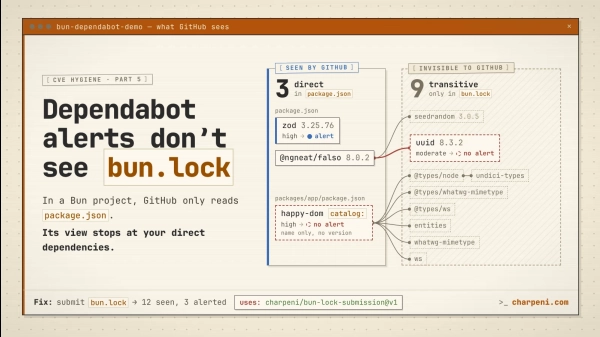
I noticed something odd on our Bun projects: every Dependabot alert was about a direct dependency. Never a transitive one.
It turns out GitHub's dependency graph doesn't read `bun.lock` yet. It supports `package-lock.json`, `yarn.lock` and `pnpm-lock.yaml`, but for Bun it falls back to `package.json`. So:
* Transitive dependencies aren't in the graph at all, so they never get an alert.
* Dependencies declared with `catalog:` are recorded with the literal version `catalog:`, which never matches an advisory.
In a minimal repro (`zod`, a package that pins an old `uuid`, and `happy-dom` through a catalog), `bun audit` finds 3 advisories and Dependabot raises 1.
Dependabot *version updates* do support Bun. This is only about alerts, which is what makes it easy to miss. And if you migrated from npm or Yarn, the alerts tied to your old lockfile get marked as fixed, even though the vulnerable packages are still in `bun.lock`.
**Are you affected?** Open Insights → Dependency graph. If your Bun projects only list `package.json` files, yes. Comparing your open alerts with `bun audit` makes it obvious.
**Fix:** until GitHub reads `bun.lock` itself, you can submit it through the dependency submission API. I made a GitHub Action for that: https://github.com/charpeni/bun-lock-submission
Full write-up, with a toggle that shows what GitHub reads versus what Bun installs: https://charpeni.com/blog/the-bun-dependabot-gap-dependabot-alerts-dont-see-bun-lock
#technology #programming #js #dev
I noticed something odd on our Bun projects: every Dependabot alert was about a direct dependency. Never a transitive one.
It turns out GitHub's dependency graph doesn't read `bun.lock` yet. It supports `package-lock.json`, `yarn.lock` and `pnpm-lock.yaml`, but for Bun it falls back to `package.json`. So:
* Transitive dependencies aren't in the graph at all, so they never get an alert.
* Dependencies declared with `catalog:` are recorded with the literal version `catalog:`, which never matches an advisory.
In a minimal repro (`zod`, a package that pins an old `uuid`, and `happy-dom` through a catalog), `bun audit` finds 3 advisories and Dependabot raises 1.
Dependabot *version updates* do support Bun. This is only about alerts, which is what makes it easy to miss. And if you migrated from npm or Yarn, the alerts tied to your old lockfile get marked as fixed, even though the vulnerable packages are still in `bun.lock`.
**Are you affected?** Open Insights → Dependency graph. If your Bun projects only list `package.json` files, yes. Comparing your open alerts with `bun audit` makes it obvious.
**Fix:** until GitHub reads `bun.lock` itself, you can submit it through the dependency submission API. I made a GitHub Action for that: https://github.com/charpeni/bun-lock-submission
Full write-up, with a toggle that shows what GitHub reads versus what Bun installs: https://charpeni.com/blog/the-bun-dependabot-gap-dependabot-alerts-dont-see-bun-lock
#technology #programming #js #dev